JavaScript: Calculate division of Two Numbers
- Home
- Calculations
- JavaScript: Calculate division of Two Numbers
- On
- By
- 0 Comment
- Categories: Calculations, division
JavaScript: Calculate division of Two Numbers
JavaScript: Calculate the division of Two Numbers
In this tutorial, we will discuss the title of the JavaScript: Calculate division of Two Numbers
In this topic, we are going to learnhow to write a program to divide two numbers in the JavaScript programming language.
Division of two numbers

JavaScript program for dividing two numbers
Program 1
Here, We use the division(/) operator to find the division of the given two numbers.
The program calculates the division of the two numbers 70 and 5; the output is displayed here.
// JavaScript program to division of two number
const f_Num=70;
//declare and initaiize variable f_Num
const l_Num=5;
//declare and initaiize variable l_Num

//calculate division of given two numbers
const div=f_Num/l_Num;

//display the division of two numbers
console.log('The division of '+f_Num+' and '+l_Num+' is: '+div);
When the above code is executed, it produces the following result
The division of 70 and 5 is: 14
JavaScript program for dividing two numbers using HTML
Program 2
Here, We use the division(/) operator to find the division of two numbers. The program calculates the division of two numbers 30 and 5 then the output is displayed here using HTML
Division of two numbers
When the above code is executed, it produces the following result
Division of 30 and 5 is: 6
JavaScript program for dividing two numbers using the function
Program 3
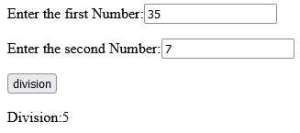
The program asks the user to enter two numbers using the form, then the result of the division of two numbers is displayed when the user clicks the “division” button.
Division of two numbers Enter the first Number:
Enter the second Number:
When the above code is executed, it produces the following result
Similar post
Java program to divide two numbers
C program to divide two numbers
C++ program to divide two numbers
Python program to divide two numbers
Java program to divide two floating-point numbers
C program to divide two floating-point numbers
Popular post
 Python program to add two number using function
Python program to add two number using function In this tutorial, we will d...
- Python program to calculate electricity bill
Python program to calculate electricity bill In this tutorial, we will disc...
- Python program to count vowels or consonants of the given string
Python program to count vowels or consonants of the given string In this ar...
- C++ program to count the total number of characters in the given string
C++ program to count the total number of characters in the given string In...
- Python program to check a number is even or odd using function
Python program to check a number is even or odd using function In this tuto...
- Python program to multiply two numbers
Python program to multiply two numbers In this tutorial, we will discuss Py...
- Java program to display multiplication table
Java program to display multiplication table In this tutorial, we will disc...
- Python program to find factorial of a number using while loop
Python program to find factorial of a number using while loop In this tutor...


